
Executive summary
If you’ve ever wondered why traders talk about “proxies,” “VPNs,” and “bots,” the short version is: they’re all ways to make an online connection more controlled – more private, more consistent, and less dependent on your laptop staying on all night. Regulators describe modern markets as highly automated, and trading systems are built to operate fast and continuously, which is exactly why connection stability and “always-on” computing matter.
A VPS (Virtual Private Server) is a practical middle ground: it’s your own always-online server in a data center, so your proxy/VPN endpoint and/or trading software doesn’t stop when your home internet blips or your computer sleeps.
In this article, you’ll get plain-English definitions, practical scenarios, a quick comparison table, and a simple connection diagram – plus exactly which VPS features to look for (with specific, source-backed highlights from Hosting.international).
Proxy, VPN, and trading bots in plain English
A lot of confusion comes from the fact that these tools overlap – but they’re not the same thing.
Proxy (plain-language definition)
A proxy is a “middle helper” on the internet. Instead of your device talking directly to a website or service, the proxy sits in between – accepting traffic, processing it, and forwarding it. One security glossary definition describes a proxy as an application that “breaks” the direct connection between client and server by receiving certain traffic and forwarding it.
VPN (plain-language definition)
A VPN is best thought of as a private, encrypted tunnel that runs over the public internet. In official security glossary language, a VPN is a virtual network built on top of existing networks to provide secure communications for data traveling between networks or nodes.
In practice, the key “feel” is: when you’re connected to a VPN, your device is securely connected to a VPN server, and your online traffic can appear to come from that VPN server location instead of your current network.
Trading bots and algorithms (plain-language definition)
A trading bot (or “algo”) is software that can make trading decisions and/or place orders automatically based on rules you set. A European central banking source defines algorithmic trading as trading where a computer algorithm automatically determines order details (like when, price, quantity, and order management) with limited or no human intervention.
A U.S. market regulator similarly describes algorithmic strategies as programs that generate and route orders or order-related messages automatically, without a person manually intervening in each step.
The simplest way to remember the difference
A proxy is mainly about routing (who connects “through” whom). A VPN is mainly about secure tunneling (privacy + integrity while data travels). Many proxies do not automatically encrypt traffic end-to-end by themselves, while VPNs are specifically built around an encrypted tunnel concept.

Where a VPS fits in: privacy, speed, and reliability
Here’s the big idea: a VPS can be the “stable home base” for your trading connection.
Why does that matter?
Because modern trading infrastructure rewards consistency. Regulators note that trading and communication at exchanges are largely automated, operating at extremely fast timescales, and that market participants often reduce delay by placing computing closer to exchange systems.
You don’t need to be a high-frequency trader to benefit from that logic. Even for everyday trading, a stable network path, fewer disconnects, and a consistent IP address can reduce friction: fewer surprise logouts, fewer “your session expired,” fewer interruptions right when you’re trying to manage a position.
The VPS intersection points that matter most
Here’s how proxies/VPNs and VPS hosting naturally intersect in real life:
Privacy when you’re not on a trusted network
A VPN is designed to create a secure tunnel so you can use public Wi‑Fi (airport, hotel, coworking) without exposing your traffic as easily to local snooping.
A VPS lets you host your VPN endpoint – so you’re not sharing an exit IP with thousands of strangers on a mass VPN service.
Latency and geographic location
Distance adds delay. Even official discussions of market structure highlight that reducing “latency” often involves placing computing closer to exchange matching engines and data feeds to minimize transmission time.
A VPS gives you location choice: you can run your tools from a region that makes sense for your broker/exchange connectivity and your own geography.
Reliability and 24/7 uptime
Automated trading is, by nature, “always-on.” Hosting-focused guidance about trading VPS setups emphasizes 24/7 operation so trading software isn’t interrupted by local outages or unstable home internet.
A VPS exists specifically to stay online even when your personal device doesn’t.
IP stability for security controls
Some trading-related platforms support IP allowlists (also called IP whitelisting) so API keys only work from approved IP addresses – reducing damage if a key leaks.
A VPS with a dedicated/static IP is a natural match for this model because your “approved IP” doesn’t keep changing.
Important note on ethics and compliance: proxies and VPNs are best used for security, stability, and privacy – not for evading identity checks, violating platform rules, or bypassing geographic restrictions. Many financial services and exchanges treat that as a serious policy violation.
Why Hosting.international VPS fits this use case
When you’re planning a proxy/VPN + trading setup, you don’t need mystery features. You need the basics to be strong and predictable: stable networking, dedicated IP options, snapshots, and fast recovery when something breaks.
Here are the most relevant VPS features explicitly described on Hosting.international’s own pages, translated into normal language:
Dedicated public IPs and optional multiple IPv4 addresses
Their knowledge-base content states that when you purchase hosting services from them, they provide a dedicated public IP address for your server, and specifically calls out the value of a static, dedicated IP for consistent reachability.
On their Cloud VPS page, they also state that you can select up to 32 IPv4 addresses during the order (and request more via contact).
Location choice for latency
Their VPS pages describe VPS availability in Europe and Asia, including Europe in Czech Republic and Asia in Singapore.
They also describe operating autonomous systems in Czech Republic and Singapore and using multiple ISPs to improve stability and reduce single points of failure – technical wording, but the benefit is simple: fewer routing surprises.
Clear entry-level tiers and upgrade paths
Their VPS ordering page shows a concrete starting reference point (for Linux VPS): 1 vCPU, 1 GB ECC RAM, 10 GB SSD SAN storage, and 100 Mb/s unlimited bandwidth, with optional 500 Mb/s or 1 Gb/s upgrades.
Their Cloud VPS page also states resources can be scaled as your needs expand. (Exact top-end tiers aren’t fully specified on the landing-page text we can see, so treat maximum CPU/RAM/disk options as plan-dependent.)
Snapshots and quick recovery
Their Cloud VPS page explicitly lists control panel features for creating snapshots manually and automatically on a timetable – exactly what you want before you change configurations or update trading software.
Basic security building blocks
They describe managing private firewall rules from the client area, plus a “secure environment” with locked racks/cages and 24/7 monitoring aligned to ISO/IEC 27001 standards.
DDoS posture and network monitoring
Their company history content mentions “robust DDoS mitigation” for customers (high-level, not a per-plan spec sheet).
Separately, their security content claims that “high-tier VPS plans include network-level monitoring and advanced filtering capabilities.” (Again: this is described at a high level; if you need a formal DDoS SLA, confirm the exact coverage for your chosen plan.)
Support and uptime commitments
Their VPS pages emphasize 24/7 live support and show a 99.9% uptime guarantee.
They also describe professional technical assistance being available 24 hours a day via support channels.
Non-technical sizing tip (rule of thumb)
If you’re starting with (a) one VPN or proxy and (b) one lightweight trading bot or a trading terminal, the entry-level tier shown above is often a sensible place to begin. If you plan to run multiple bots, multiple accounts, or heavier data feeds, plan to scale up CPU/RAM (their platform explicitly supports scaling).
Real-world scenarios you can copy
Below are practical, non-technical “recipes” where a VPS, a proxy/VPN, and trading workflows intersect.
A stable personal VPN for travel trading
You run a VPN server on your VPS, so when you trade from hotels or cafés, your connection is encrypted and your logins come from one consistent server IP instead of “wherever the Wi‑Fi is today.”
A dedicated IP for API key allowlisting
If your platform supports IP allowlists, you can lock API access to your VPS IP, reducing the chance of someone using stolen keys from elsewhere. This is a common security pattern in API platforms and some trading services.
A “24/7 desk” for trading bots
Instead of leaving your home PC running overnight, your bot runs on the VPS. Hosting guidance for trading VPS usage highlights exactly this value: continuous operation without depending on local power or internet stability.
A safer separation between “trading” and “personal” life
You keep trading software, configs, and keys on the VPS, and access it remotely. If your laptop is lost, stolen, or cluttered with random apps, the core setup is still isolated in the server environment. Their control panel includes an always-available remote console option (“noVNC console”) for access even when things go wrong.
Rollback after a bad update
Trading tools break at the worst times. With snapshots (manual or scheduled), you can roll back to “yesterday’s working version” fast – without rebuilding everything from scratch.
Location-based performance tuning without new hardware
If you suspect connection delay is hurting execution quality, you can choose (or move to) a VPS region that’s a better match for your trading venue connectivity. Official market-structure discussions note that reducing delay often involves minimizing transmission time by placing systems closer to key infrastructure.
VPS versus home and local setups
The table below is intentionally practical: it focuses on what you’ll actually notice day-to-day.
| Benefit | VPS (hosting.international) | Home/local |
|---|---|---|
| Always-on operation | Designed to run continuously; VPS pages emphasize uptime guarantees and monitoring. | Your computer sleeps, reboots, updates, or shuts down. |
| Stable public IP | Dedicated public IP is explicitly described; optional multiple IPv4 addresses are available. | Home IP can change, and carrier-grade NAT can complicate access. |
| Location choice | Europe and Singapore options are stated; routing/network ownership details are described as part of stability strategy. | Your location is wherever you live or travel. |
| Snapshots for fast rollback | Manual and scheduled snapshots are listed as control panel features. | You must remember to back up (and many people don’t). |
| Dedicated resources mindset | VPS pages describe “guaranteed CPU, RAM, storage” and a no-overselling stance. | Your PC resources are shared with everything else you run. |
| Remote access even in “oh no” moments | “noVNC console” access is explicitly listed as a “whatever happens” access path. | If your device is off or broken, access stops. |
| Support | 24/7 support is repeatedly emphasized on VPS pages. | You are the support team. |
| DDoS posture (relevant if you host services) | DDoS mitigation and network-level monitoring/filtering are discussed in their materials (plan-specific coverage should be confirmed). | Home connections have limited protection options. |
FAQ and next step
Is a proxy the same as a VPN?
Not quite. A proxy is an intermediary that forwards traffic and breaks the direct connection path. A VPN is a secure tunnel concept designed for protected communications over existing networks. Many proxies don’t provide blanket encryption the way VPN tunneling is intended to.
Do I need both a VPN and a VPS to trade safely?
You don’t need both, but combining them can be useful: the VPS gives you an always-on “base,” and the VPN gives you an encrypted path into that base – especially helpful on public networks.
Will a VPS automatically make my trades “faster”?
It can help, mainly by improving consistency: fewer disconnects and a more direct network path. Official market-structure discussion shows why minimizing delay matters and why proximity is a known tactic in electronic markets. But it’s not magic – your strategy and platform still matter.
What VPS specs should I choose for a proxy/VPN and light trading tools?
Exact maximum tiers aren’t fully spelled out on the landing-page text, but Hosting.international shows an entry plan at 1 vCPU / 1 GB ECC RAM / 10 GB SSD SAN, and explicitly notes you can scale resources. A practical approach is: start small, benchmark your real usage for a week, then scale if needed.
How do I protect myself if I’m using API keys?
Use your platform’s security controls when available – especially IP allowlists – so keys only work from trusted IPs. That’s exactly where a VPS with a dedicated/static IP becomes convenient.
Here’s the “big picture” connection flow in one simple diagram:
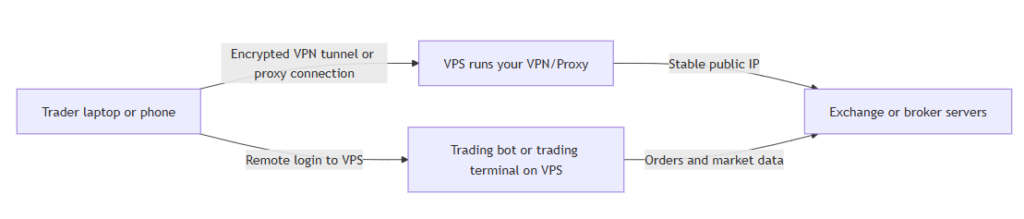
If your goal is a cleaner, more dependable trading setup – without turning your home computer into a 24/7 appliance – start with a VPS that gives you: a dedicated IP, reliable networking, snapshots for rollback, and real support at odd hours. That’s exactly the feature set Hosting.international highlights across its VPS pages (dedicated public IP, multiple IPv4 options, snapshots, private firewall controls, 24/7 support, and a 99.9% uptime guarantee).